

An alarm annunciator is a wall-mounted display panel that shows the real-time status of a fire alarm system using color-coded LEDs, an LCD screen, and push-button controls. Its job is simple but critical: tell occupants and emergency responders exactly where a problem is occurring, right now, without requiring them to find the main control panel. Understanding alarm annunciation means understanding the first thing a firefighter looks at when they walk through your building’s front door.
A typical annunciator communicates three types of signals:
- Alarm (active fire or smoke event, shown in red)
- Trouble (a system fault such as a wiring break or low battery, shown in amber or yellow)
- Supervisory (a monitored condition like a closed sprinkler valve, also shown in amber)
The panel usually sits near a building entrance or lobby, at eye level, so anyone arriving on scene can read it without searching. Controls are intentionally minimal: an Acknowledge button, a Silence switch, and a System Reset. These are designed for non-technical users under pressure.
What components and types make up an alarm annunciation system?
Every annunciator shares a core set of components, though the sophistication varies widely between conventional and addressable systems.
Core components:
- LCD or text display: Shows plain-language descriptions of the event, such as “Smoke Detector, 3rd Floor East Wing.”
- LED indicators: Green for normal operation, red for active alarm, amber for trouble or supervisory conditions.
- Acknowledge button: Silences the local panel buzzer to confirm a human has seen the alert.
- Silence switch: Turns off building notification appliances (horns and strobes) once the area is confirmed clear.
- System Reset: Returns the system to normal after the initiating device has been addressed.
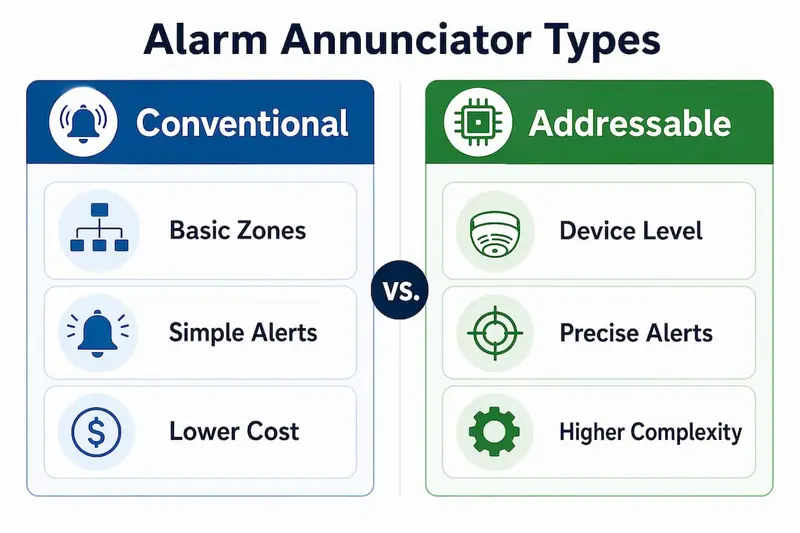
The two main system types differ in how much information they deliver:
| Type | How it identifies events | Typical use case | Key characteristic |
|---|---|---|---|
| Conventional annunciator | By zone (a group of devices) | Smaller buildings, simpler layouts | Lower cost, less precise location data |
| Addressable annunciator | By individual device | Large or complex facilities | Pinpoints exact device, floor, and room |
| Graphic annunciator | By floor plan map with LEDs | High-rises, hospitals, campuses | Visual building layout overlaid with alarm points |
Addressable systems give first responders device-level precision. A conventional system might tell you “Zone 3 is in alarm,” while an addressable system tells you “Smoke Detector, Room 402, 4th Floor North.” That difference in specificity can shave minutes off a response.
Wiring and communication protocols vary by manufacturer and system type, so proper installation always requires consulting the product data sheets for the specific equipment being used.
Why alarm annunciators are critical for fire safety and emergency response
The annunciator provides emergency responders immediate, at-a-glance information about a fire’s origin. Without it, firefighters arriving at a large building have no fast way to locate the source of an alarm. They would need to find the main control panel, which is often locked in a basement or utility room, and then interpret its display under pressure.
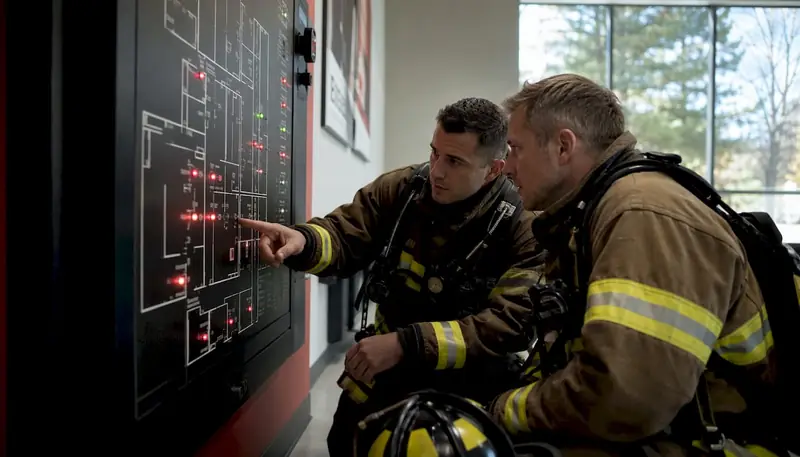
Annunciators placed strategically in large or complex facilities also enhance evacuation management by giving real-time information to on-site staff. A security desk annunciator, for example, lets a guard direct occupants away from the affected floor before firefighters even arrive.
The effectiveness of an annunciator is measured by one thing: how quickly a firefighter unfamiliar with the building can pinpoint the fire’s location. That speed depends almost entirely on how the zones are labeled. Zones must have intuitive, AHJ-approved names that match how people actually navigate the building. A zone labeled “AHU-7B” means nothing to a firefighter. “3rd Floor Server Room” does.
Local building codes, particularly in multi-floor buildings, hospitals, and high-rises, often require annunciators as a condition of occupancy. The Authority Having Jurisdiction (AHJ) reviews and approves annunciator placement and labeling before a system passes inspection.
Pro Tip: Label every zone using the language a first responder would use, not the language your HVAC contractor used. Walk the building with your local fire marshal before finalizing zone names.
How does an annunciator differ from a fire alarm control panel?
Fire safety professionals draw a clear line between these two components. The fire alarm control panel (FACP) is the system’s brain. The annunciator is its face.
What the FACP does:
- Receives signals from smoke detectors, heat detectors, pull stations, and other initiating devices
- Processes those signals and determines the appropriate response
- Activates notification appliances (sirens, strobes, and speakers)
- Supervises system health continuously, detecting open circuits, low batteries, and device faults
- Logs all events for review
What the annunciator does:
- Displays FACP data at a remote, accessible location
- Lets authorized personnel acknowledge, silence, and reset the system
- Shows alarm, trouble, and supervisory status in real time
- Guides first responders to the correct location without requiring access to the main panel
The FACP is typically installed in a secure electrical or mechanical room. The annunciator goes where people can actually see it: a lobby, a security desk, or a fire command center. As the Wisconsin DSPS guidance notes, even when a remote annunciator performs some of the same display functions as the FACP, it is not considered the FACP. These are legally and functionally distinct components, and a facility must meet separate code requirements for each.
The FACP also carries a higher price point, reflecting its processing role. The annunciator is a display and control interface, not a signal processor.
Where should annunciators be installed, and in what buildings?
NFPA 72 does not mandate a single universal location for annunciators. Instead, it delegates final placement decisions to the local AHJ, who tailors requirements to the specific building and the needs of local responders. That said, common placement locations follow a consistent pattern across jurisdictions.
Typical installation locations:
- Main building entrance or lobby (most common, gives arriving firefighters immediate access)
- Security or guard desk (enables staff to monitor and respond before responders arrive)
- Fire command center (required in high-rises and large complexes under many codes)
- Each floor in multi-story buildings (floor-level annunciators show only that floor’s status)
- Building entrances in multi-building campuses
In multi-floor buildings, remote annunciation is often required specifically for the fire department, so first responders know where to go the moment they arrive. The AHJ determines the type and exact location of required annunciation for each property.
Installation best practices:
- Mount at a height between 15 inches and 6 feet from the floor for visibility and accessibility
- Keep the panel unlocked and unobstructed at all times
- Ensure zone labels are approved by the AHJ before the system goes live
- In high-rises, provide annunciators at stairwells and building entrances per NFPA 72 requirements
- Integrate annunciator locations into staff training and emergency response plans
Hospitals and assisted living facilities face additional requirements. Texas Administrative Code, for example, specifies that assisted living facilities must provide fire alarm annunciation at the staff area on each floor, with the remote annunciator located at or near that area and accessible to staff at all times.
How to maintain and troubleshoot your annunciator
Routine maintenance keeps an annunciator reliable when it counts. Neglected panels develop communication faults, burned-out LEDs, or sticky buttons that fail during an actual emergency.
Standard maintenance tasks:
- Test the LCD display and all LED indicators for proper function
- Verify that Acknowledge, Silence, and Reset buttons respond correctly
- Check wiring connections at the backbox for corrosion or looseness
- Confirm communication between the annunciator and the FACP is active
- Review the event log for any unresolved trouble or supervisory conditions
- Test audible signals on the panel itself
Basic troubleshooting:
- A “Trouble” LED that won’t clear after reset often points to a wiring fault or a disconnected device on that zone
- A blank LCD usually indicates a power supply issue or a failed display board
- Intermittent communication faults between the annunciator and FACP can result from damaged cable runs or incorrect termination
Always follow the manufacturer’s product data sheets for wiring specifications and diagnostic procedures. Generic troubleshooting steps can miss system-specific requirements that vary by manufacturer. For complex faults, consult a licensed fire alarm technician rather than attempting field repairs on a life-safety system.
Pro Tip: Keep a written maintenance log at or near the annunciator. Document every test, fault, and repair with the date and technician name. AHJ inspectors frequently ask for this record, and gaps in documentation can trigger compliance issues.
Proper upkeep also reduces false alarms. A malfunctioning annunciator that generates spurious trouble signals trains occupants to ignore alerts, which is exactly the wrong outcome in a real emergency. A practical fire alarm system checklist can help facility managers stay on schedule with these tasks.
How alarm annunciation technology evolved over time
Early fire alarm systems in the late 19th and early 20th centuries relied on simple telegraph-style circuits. When a pull station activated, a bell rang and a needle on a dial pointed to a zone number. That was the entire annunciation system. Responders had to consult a paper map to translate the zone number into a physical location.
By the mid-20th century, conventional zone panels replaced dial indicators. These panels used rows of labeled light bulbs, one per zone, wired so that a fault or alarm in any zone lit the corresponding bulb. The improvement was real but limited: a zone might cover an entire floor or wing, leaving responders to search a large area.
The shift to addressable systems in the 1980s and 1990s changed everything. Digital communication protocols allowed each detector and device to carry a unique address, so the annunciator could display not just a zone but a specific device. Text displays replaced light-only panels, and the information density increased dramatically.
Graphic annunciators followed, overlaying alarm points onto floor plan diagrams with LED indicators at each device location. A firefighter could look at the panel and see a building map with a red dot at the exact room where smoke was detected. This format became standard in hospitals, high-rises, and large commercial facilities.
How modern annunciators integrate with smart building systems
Contemporary annunciators connect to building management systems (BMS) and network-based fire alarm platforms, extending their reach well beyond a single wall-mounted panel. A facility manager can receive alarm and trouble notifications on a desktop dashboard or a mobile app, with the same zone and device information the lobby panel displays.
Network-connected systems allow advanced fire detection devices to feed data into centralized monitoring platforms, where security staff can track system status across multiple buildings from one screen. This is particularly useful for campus environments, healthcare networks, and property management companies overseeing multiple sites.
Integration with access control and elevator systems adds another layer. When an alarm activates, the building management system can automatically recall elevators to the ground floor, unlock stairwell doors, and alert security personnel, all triggered by the same signal the annunciator displays. The annunciator itself remains the primary human interface at the point of entry, but it now sits within a broader network of coordinated responses.
Voice evacuation systems represent another integration point. Modern annunciators can link to mass notification platforms, so the same event that lights up the panel also triggers pre-recorded or live voice instructions over the building’s speaker system.
What does a typical annunciator interface look like in practice?
Walk into the lobby of a mid-size office building and you will usually find the annunciator mounted near the main entrance at about chest height. The panel face is clean: a rectangular LCD screen at the top, a column of LEDs below it, and three or four buttons along the bottom edge.

Under normal conditions, the LCD reads “System Normal” and a single green LED glows steadily. When a smoke detector activates on the fourth floor, the display changes immediately: “FIRE ALARM: 4th Floor, Suite 410, Smoke Detector.” The green LED goes dark, a red LED illuminates, and an audible buzzer sounds on the panel itself.
A security guard or arriving firefighter presses the Acknowledge button. The buzzer stops, confirming the alert has been seen. The red LED and the display message stay active until the event is resolved. If the guard confirms a false alarm and the initiating device is reset, pressing System Reset returns the display to “System Normal” and the green LED comes back on.
In a hospital with a graphic annunciator, the interface looks different. A backlit floor plan of the building covers most of the panel face, with small LED indicators at each device location. When an alarm triggers, the LED at that exact device location turns red, and the floor plan makes the location unmistakable even to someone who has never been in the building before. This format is especially effective for healthcare fire detection environments where rapid, precise response is non-negotiable.
What regulatory standards govern alarm annunciation?
NFPA 72, the National Fire Alarm and Signaling Code, is the primary standard governing alarm annunciation in the United States. It defines the means of signal initiation, transmission, notification, and annunciation, along with minimum performance levels and installation requirements for fire alarm systems and their components.
Key NFPA 72 requirements relevant to annunciators include:
- All required annunciation must be located as directed by the AHJ to support efficient emergency response (Section 10.18.3.2)
- The zone of origin must always be displayed when an alarm occurs
- If the annunciator does not show all zones simultaneously, it must indicate that other zones are also in alarm
- Zone names must be approved by the AHJ and must be intuitive for first responders
Local amendments to NFPA 72 can add requirements specific to a jurisdiction. New York City and Florida, for example, have local fire codes that specify annunciator placement in detail beyond the base NFPA 72 language. Always verify requirements with your local AHJ, not just the national standard.
The AHJ reviews annunciator placement, labeling, and function during the plan review and final inspection process. A system that passes NFPA 72 on paper but uses zone names that don’t match building logic will still fail inspection. The standard is clear: if the annunciation makes no sense to first responders, it defeats its entire purpose.
For assisted living facilities and healthcare buildings, additional state-level regulations layer on top of NFPA 72. Texas, for instance, requires annunciation at each floor’s staff area under 26 TAC Chapter 553, a requirement that goes beyond what the national code mandates for general commercial buildings.
Key Takeaways
A fire alarm annunciator is the remote display interface that translates fire alarm control panel signals into clear, location-specific information for first responders and building staff at the point of entry.
| Point | Details |
|---|---|
| Annunciator vs. control panel | The FACP processes signals; the annunciator displays them remotely for responders and staff. |
| Zone labeling is critical | AHJ-approved, intuitive zone names determine how fast a firefighter finds the fire’s origin. |
| Placement follows AHJ rules | NFPA 72 delegates annunciator location decisions to the local AHJ, not a universal standard. |
| Addressable systems give device-level detail | Addressable annunciators identify the exact device triggered, not just a zone or floor. |
| Maintenance prevents failure | Regular LED, button, and communication tests keep the annunciator reliable during real emergencies. |
Get professional annunciator support from Reliable-fire-protection
Reliable-fire-protection serves Houston-area residential and commercial properties with certified fire alarm installation, inspection, and maintenance. Whether you need a new annunciator installed, an existing system brought into AHJ compliance, or a full fire alarm system evaluation, the team at Reliable-fire-protection brings the local code knowledge and hands-on experience your property requires. Contact Reliable-fire-protection for a free quote and find out exactly what your building needs to meet current safety standards.