Yes, you can usually switch monitoring companies and keep your existing alarm equipment, provided three gates clear: the panel supports outside programming access, the communicator can be released or replaced, and your sensors aren’t locked to a proprietary platform. When those check out, the right sequence is confirm compatibility, activate and verify the new connection, then cancel the old service, never the reverse.
TL;DR:
- Compatibility mainly depends on the panel’s programming access, the communicator’s network type, and whether sensors use proprietary protocols, which can block a takeover.
- A successful takeover requires verifying hardware status, obtaining written confirmation from the old provider, and conducting supervised signaling tests before cancelling service.
- Obsolete communication modules, installer-locked panels, and proprietary sensor protocols are common barriers that delay or block monitoring transitions.
- Proper documentation, including equipment inventory, signaling test results, and automated test confirmation, is essential for legal and insurance purposes.
- Most failures result from poor sequencing or lack of proper documentation, not from the cost or physical hardware remaining intact.
Table of Contents
- What Is an Alarm Monitoring Takeover?
- The Five Technical Layers a Provider Evaluates
- Can My System Be Taken Over? A Compatibility Checklist
- The Correct Takeover Sequence, Step by Step
- What to Keep, Upgrade, or Replace
- Takeover Costs and How Long It Actually Takes
- Red Flags That Block or Delay a Takeover
- What a Properly Documented Takeover Looks Like
- The Real Lesson From Every Failed Takeover
- Ready for a Takeover Survey? Here’s What Reliable Fire Protection Does
- Sources
What Is an Alarm Monitoring Takeover?
An alarm monitoring takeover means a new provider assumes monitoring duties on your existing control panel and field devices, rather than tearing out the system and starting fresh. It’s different from a full replacement, where the panel, keypads, and sensors all get swapped for new hardware. A takeover only makes sense when the underlying equipment is sound and reasonably current.
Most people pursue a takeover for one of a few reasons: the old provider’s service has slipped (recurring complaints about response times and billing show up constantly on review sites like Trustpilot), a local company can offer faster support than a national call center, or an insurer and local fire code require continuous, documented monitoring during a transition.
Takeovers have real limits, though:
- Closed consumer ecosystems tied to a single app or cloud account often can’t be reassigned to an independent monitoring center at all.
- Panels older than about a decade frequently lack the memory or firmware to support modern communicators.
- Some door and window contacts use proprietary wireless protocols that only talk to one brand’s panel.
Knowing which bucket your system falls into before you call anyone saves a lot of wasted time.
The Five Technical Layers a Provider Evaluates
A competent takeover isn’t a single check. It’s a stack of five evaluations, and skipping any one of them is how properties end up with a system that looks connected but isn’t actually reporting anywhere.
- Devices and wiring. The technician inspects every contact, motion sensor, and smoke detector for age, corrosion, and wiring integrity, since a takeover only pays off if the field hardware is still reliable.
- Panel and programming access. Can the incoming provider actually get into the panel’s programming menu? This hinges on installer or dealer codes, which the previous company may or may not hand over willingly.
- Communicator and communication path. The panel’s link to the outside world, whether cellular, IP, or dual-path, gets tested for signal strength and redundancy. Local dealer evaluations built around this five-layer model consistently flag the communicator as the most common point of failure.
- Monitoring instructions and documentation. Dispatch rules, permit numbers, and zone descriptions all need to transfer accurately, or the new monitoring center will send police to the wrong door or skip a required verification call.
- Customer experience. App access, user codes, and basic training on the new provider’s interface round out the evaluation, since a system nobody in the building knows how to use isn’t really monitored.
Pro Tip: Ask any prospective provider to walk you through these five layers before they quote a price. If they only talk about the app and skip the panel and communicator questions, they haven’t actually evaluated your system.
Can My System Be Taken Over? A Compatibility Checklist
Run through this before you sign anything or cancel your current service.
- Find your panel model number. It’s usually printed on a label inside the metal enclosure, often near the transformer or battery compartment.
- Locate the communicator’s IMEI or MAC address. This is typically on a separate module attached to or near the main panel board, sometimes on its own sticker.
- Ask your current provider, in writing, to release the communicator. A written request creates a paper trail if there’s a dispute later, and proactive written confirmation from the old provider heads off most disputes before they start.
- Check the communicator’s radio type. If it’s a 2G or 3G-only module, it’s already obsolete. Carriers have been sunsetting those networks, and industry sources have flagged 2G/3G retirement as one of the most common reasons a takeover stalls until the communicator gets swapped for an LTE model.
- Watch for proprietary sensor protocols. If your door and window sensors only pair with one brand’s hub, they typically can’t migrate to an independent monitoring platform.
Confirm first. Cancel last.
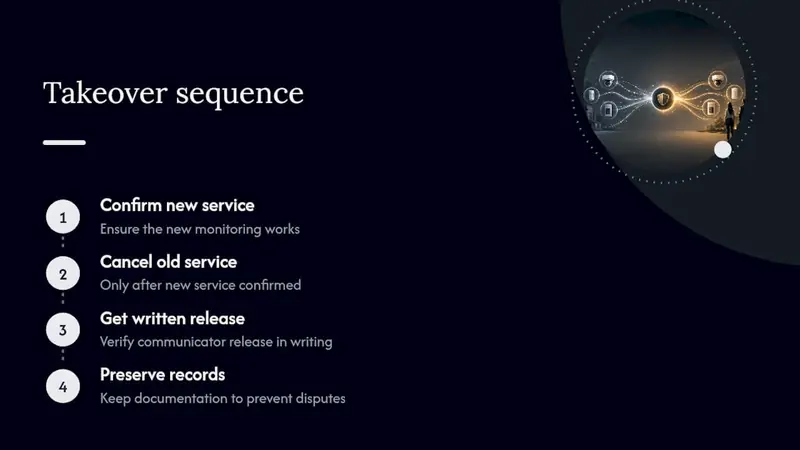
The Correct Takeover Sequence, Step by Step
Order matters more than almost anything else in this process. Skip a step or do them out of sequence and you risk days without coverage.
- Document everything first. Photograph the panel label, the communicator module, and any visible model numbers. Note the account status with your current provider.
- Get written compatibility confirmation from the incoming provider. They should confirm, in writing, that your specific panel model and communicator can be programmed and monitored on their platform.
- Schedule an on-site survey. A technician should physically inspect the system and run supervised signaling tests with the new monitoring center to confirm signals actually arrive and map to the right zones.
- Activate, then verify. Trip a few zones deliberately, check that events show up correctly in the monitoring center’s log, and confirm the daily automated test timer, sometimes called a heartbeat, is reporting on schedule.
- Only then, cancel the old service. Get confirmation in writing that the previous provider has closed the account and released the communicator.
- Follow up. Collect your service certificate, update any local fire or alarm permits, and confirm with your insurer or local police department that response protocols reflect the new monitoring center.
Pro Tip: Never cancel your old monitoring contract on the same day you activate the new one. Give it at least 24 to 48 hours of verified, quiet operation first, so you catch any signaling gaps while both providers are still reachable.
What to Keep, Upgrade, or Replace
Most of the expensive, hard-to-install parts of a security system are the parts most likely to survive a takeover intact. Physical infrastructure, meaning hardwired door and window contacts, mounting brackets, and existing conduit runs, tends to hold up fine for years, and provider-side experience confirms that cabling and mounts are usually the easiest things to retain, even when the failures show up elsewhere in the system.
What usually needs an upgrade:
- The communicator, especially if it’s still running 2G or 3G radio hardware.
- The keypad, if you want app integration or newer user code management.
- The backup battery, which degrades over 3 to 5 years regardless of how well the rest of the system holds up.
Replacement becomes the more sensible path when the panel’s installer code is permanently locked with no recovery option, when there’s simply no LTE communicator available for that panel generation, or when the entire system runs on a closed, proprietary cloud platform that no outside monitoring center can access. In rough terms, a communicator swap alone runs far less than a selective upgrade with a new keypad and battery, and both cost a fraction of full panel-and-sensor replacement. Get a provider’s actual quote before assuming which category you’re in.
Takeover Costs and How Long It Actually Takes
Monthly monitoring costs vary by what you’re actually buying. Single-path cellular monitoring for a residential property sits at the lower end of the market; dual-path monitoring, verified video response, and commercial-grade service with higher call volume push the price up. One-time costs for the technician visit, a new communicator if needed, and basic reprogramming typically land in a moderate range, well below full system replacement.
- Cancellation notice periods vary by contract, but many run 30 days, so timing your new activation before the old contract lapses avoids a gap.
- A same-day survey is realistic for most single-family homes.
- Coordinating communicator release, updating monitoring center records, and handling any permit paperwork usually takes between 1 and 14 days, depending on how responsive the outgoing provider is.
The gap between “technically possible in a day” and “actually done in two weeks” almost always comes down to how fast the old provider responds to the release request, not anything on the new provider’s end.
Red Flags That Block or Delay a Takeover
A few recurring problems account for most failed or delayed takeovers.
- Installer-code-locked panels. If the previous provider won’t share the code and the manufacturer has no backup recovery process, your options are a factory reset (which wipes programming) or a new panel.
- Communicators still registered to the old account. Until that registration is formally released, the new provider often can’t activate service on it, which is why a written release request matters as much as it does.
- Silent 2G/3G failures. A panel on a sunset network may appear to function locally while it’s actually sending nothing to any monitoring center. This is exactly the kind of failure a daily test timer is built to catch.
- Missing maintenance records. No recent service history can slow down insurer or police response verification, since some jurisdictions and insurers want documented proof of a working, tested system.
Pro Tip: If your panel is installer-locked and the current provider is slow to respond, ask the incoming provider whether they can request the code directly from the manufacturer with proof of ownership. It sometimes works even when the outgoing company won’t cooperate.
What a Properly Documented Takeover Looks Like
A takeover done right leaves a paper trail, not just a working panel. That written record is what protects you if an insurer, fire marshal, or future buyer ever asks whether the system was properly transitioned. Standards bodies like the NFPA publish guidance on documented maintenance precisely because verbal assurances don’t hold up during an actual claim or inspection.
A proper takeover report typically includes:
- A full equipment inventory, panel model, communicator type, and sensor count.
- Any defects found during the on-site survey, with recommended remediation.
- Results of the supervised signaling test, showing each zone reported correctly.
- Confirmation that the daily automated test timer is active and reporting.
Reliable Fire Protection builds every fire alarm monitoring takeover around this documentation standard, because a verified report is what makes the difference between “it should be working” and knowing it is. Post-activation, technicians walk the customer through user codes, app access, and what the daily heartbeat test actually means for response times.
The Real Lesson From Every Failed Takeover
Most advice on this topic focuses on price comparisons between monitoring companies, as if the monthly rate is the thing that determines success. It isn’t. Every takeover that goes sideways fails on sequencing or documentation, not cost. Someone cancels the old service before confirming the new one works, or nobody gets written proof that a communicator was actually released, and three weeks later there’s a dispute nobody can settle.
The conventional wisdom also underrates how much of a system is worth keeping. Property owners often assume switching monitoring means starting over, when in most cases the wiring, contacts, and mounts are the least of the problem. The panel’s programming access and the communicator’s registration status are what decide everything, and those are exactly the two things most homeowners never check before calling around for quotes.
If you take one thing from this, prioritize the written compatibility confirmation before you touch your current contract. Everything else, upgrades, cost comparisons, even the activation date, can wait until that piece is settled.
— Results
Ready for a Takeover Survey? Here’s What Reliable Fire Protection Does
Reliable Fire Protection runs takeovers the way this article describes: survey first, written confirmation second, activation and verification before anything gets cancelled. That’s the difference between a switch that goes smoothly and one that leaves your property unmonitored for a week while two companies point fingers.
Before your survey, gather a few things: photos of your panel label, the communicator’s IMEI or MAC address if you can find it, and any recent service records or permits on file. That paperwork lets the technician assess compatibility fast instead of guessing. On the visit itself, expect a full inspection of your panel, wiring, and communicator, followed by a written recommendation covering what can stay, what needs an upgrade, and what a full replacement would cost if that turns out to be the better path. Reliable Fire Protection handles surveys, selective upgrades, and full replacements alike, so the recommendation fits your actual system rather than a one-size answer. Request a quote through the Energy Corridor fire alarm services page and get a technician scheduled for your compatibility survey.
Sources
- NFPA
- Alarm System Takeover: Switch Monitoring, Keep the Panel
- Alarm System Takeover & Switch Monitoring | Cunningham
- Taking Over a Building’s Security System Instead of Ripping It Out